Guide · 3 steps
Find out what works in your channels
The Recommendations tab ranks your own posts by average views: content type, posting window and text length.
Step 1
Open the tab
Open Analytics and choose the Recommendations tab.
The tab is on Pro and Business. Other plans see an upgrade card.

Step 2
Read the three lists
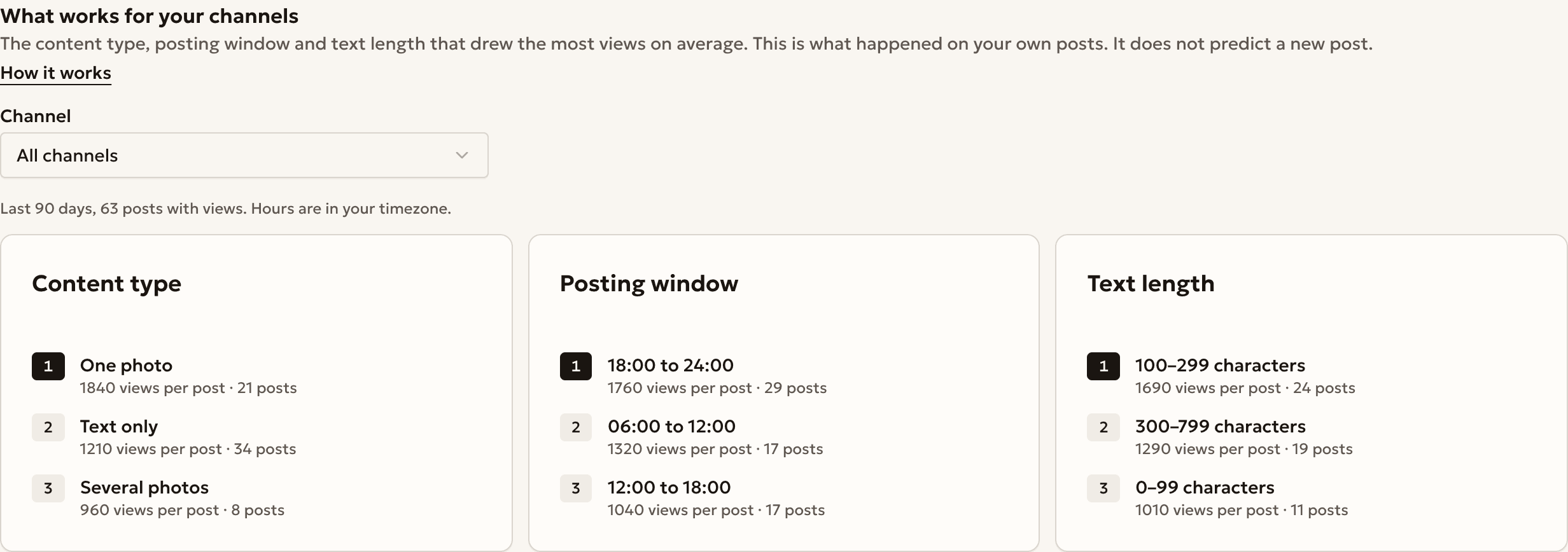
Each list ranks three choices by views per post: Content type, Posting window and Text length. Choose a Channel to see one channel only.
Autogram reads the posts of the last 90 days. It needs 30 posts with views. Hours are in your time zone.
Step 3
Use the length hint
In the new post window, a line under the text field gives the length that drew the most views in the chosen channel.
The line stays hidden when the plan is below Pro or the channel has too few posts with views.

Example
A tech channel
Tech News Daily has 63 posts with views in the last 90 days.
- Channel
- Tech News Daily
- Content type
- One photo, 1840 views per post
- Posting window
- 18:00 to 24:00
- Text length
- 100–299 characters
Evening posts of about 280 characters did best.
Common questions
Why are my lists empty?
A list needs 30 posts with views in the last 90 days. The tab shows how many posts you have. Autogram reads the views of your posts from Telegram, so a new post counts after the next read. Type the views of an older post to count it.
Does it predict my next post?
No. It shows what happened on your own posts. A choice needs at least 3 posts to be ranked.
Which plan do I need?
Pro or Business. The AI report is on the same plans.
Ready to start?
Create an account and connect your channel.