Guide · 3 steps
Copy a group onto other channels
Copy the automations of a group onto other channels you own. The copies keep the schedules, instructions and channel settings, and start paused.
Step 1
Open the group
Open Automation, choose Groups, open a group and press Duplicate.
The button is active when the group has at least one automation.

Step 2
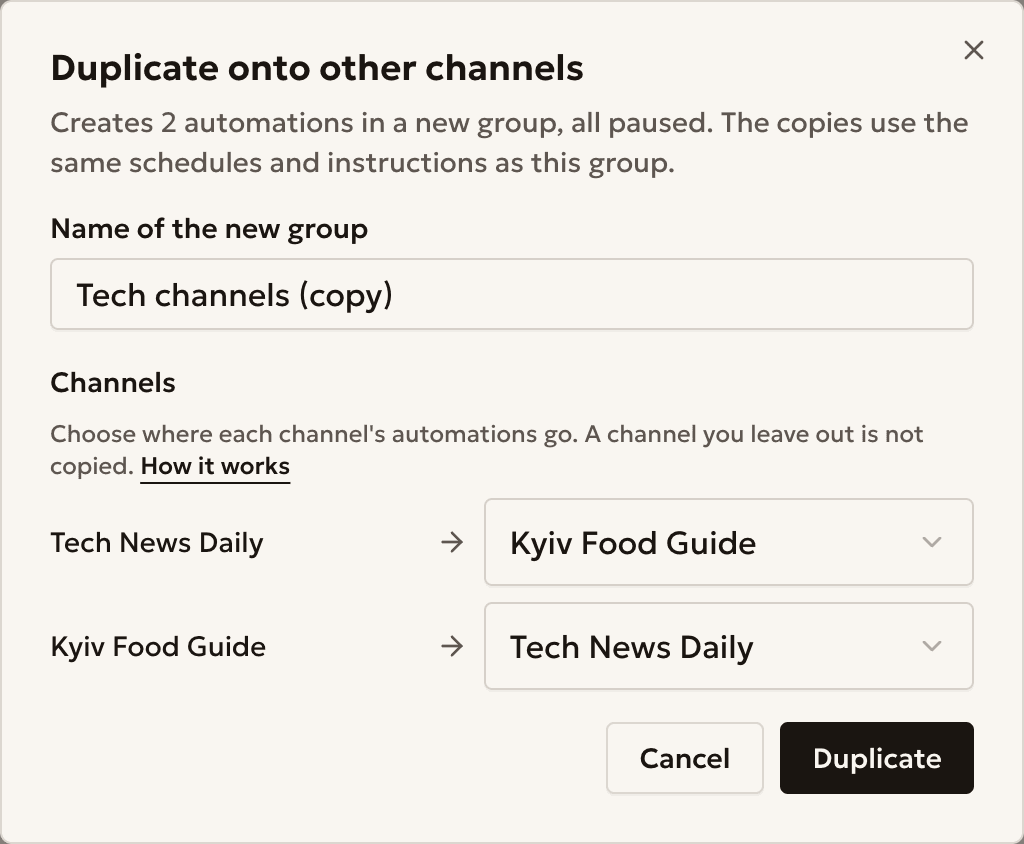
Choose the channels
For each channel, choose the channel the copy goes to, or Do not copy. Then press Duplicate.
Each copy needs its own channel. Only your own channels are in the list.
Step 3
Check and resume
The new group opens. Check the copies, then press Resume all.
Nothing is published before you resume the copies.

Example
Twelve zodiac channels in English
An owner runs twelve zodiac channels in Ukrainian and opens twelve new channels in English.
- Group
- Zodiac
- Copies
- 8 automations, paused
- New group
- Zodiac (copy)
Common questions
Which plan do I need?
Every plan. Each copy counts toward the automation limit of your plan. If the copies do not fit, nothing is created.
What is not copied?
The history: posts, deliveries and run results. A copy also does not know which feed or news items the first automation already used, so its first run can repeat a recent item.
Does a change to a schedule change both groups?
Yes. The copies use the same schedules and instructions as the first group.
Ready to start?
Create an account and connect your channel.