Guide · 3 steps
Post a first comment under each post
After a post goes out, Autogram replies to it in the linked discussion group with a text that you write once.
Step 1
Turn on the first comment
Open Channels, press Edit on a channel, open the Publishing tab and turn on First comment.
The first comment needs the Solo plan or higher, and a discussion group linked to the channel.

Step 2
Write the template
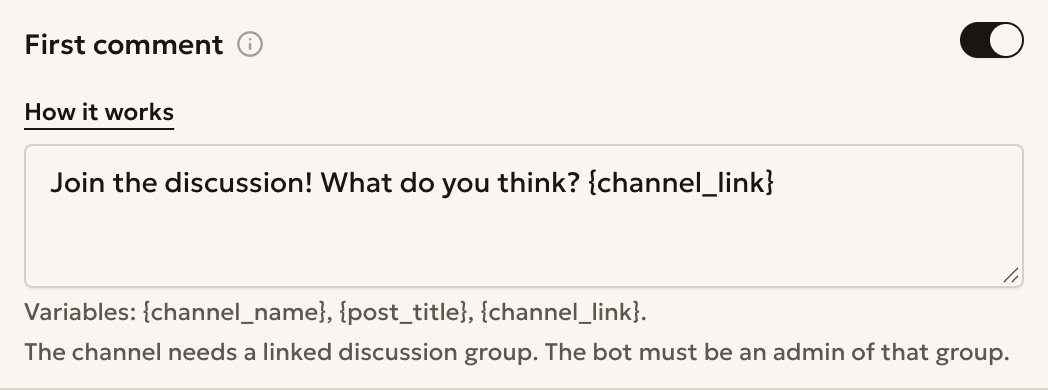
Write the comment text. You can use {channel_name}, {post_title} and {channel_link}.
The bot must see the messages of the group: make it an admin of the group.
Step 3 · Optional
Choose it for one post
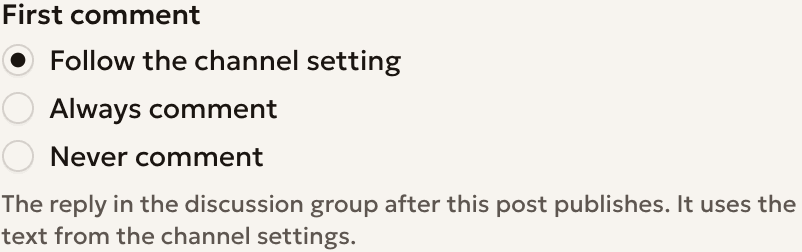
In the new post window, open Advanced and choose Follow the channel setting, Always comment or Never comment.
Manual, scheduled and automation posts all follow the channel setting.
Example
A discussion starter
A channel invites readers to talk under every post.
- Template
- Join the discussion! What do you think? {channel_link}
- Group
- The discussion group linked to the channel
- When
- After each post goes out
Common questions
Which plan do I need?
Solo or higher. On Free the switch is off and a note names the plan.
Why did a post get no comment?
Autogram waits up to 10 minutes for Telegram to forward the post into the group. When it does not arrive, Autogram does not comment. Check that the channel has a linked group and that the bot is an admin of that group.
How long can the template be?
Up to 1,000 characters.
Ready to start?
Create an account and connect your channel.