Guide · 3 steps
Send a post as a rich message
A rich message can hold tables, block quotes, lists and disabled buttons. You write it as text.
Step 1
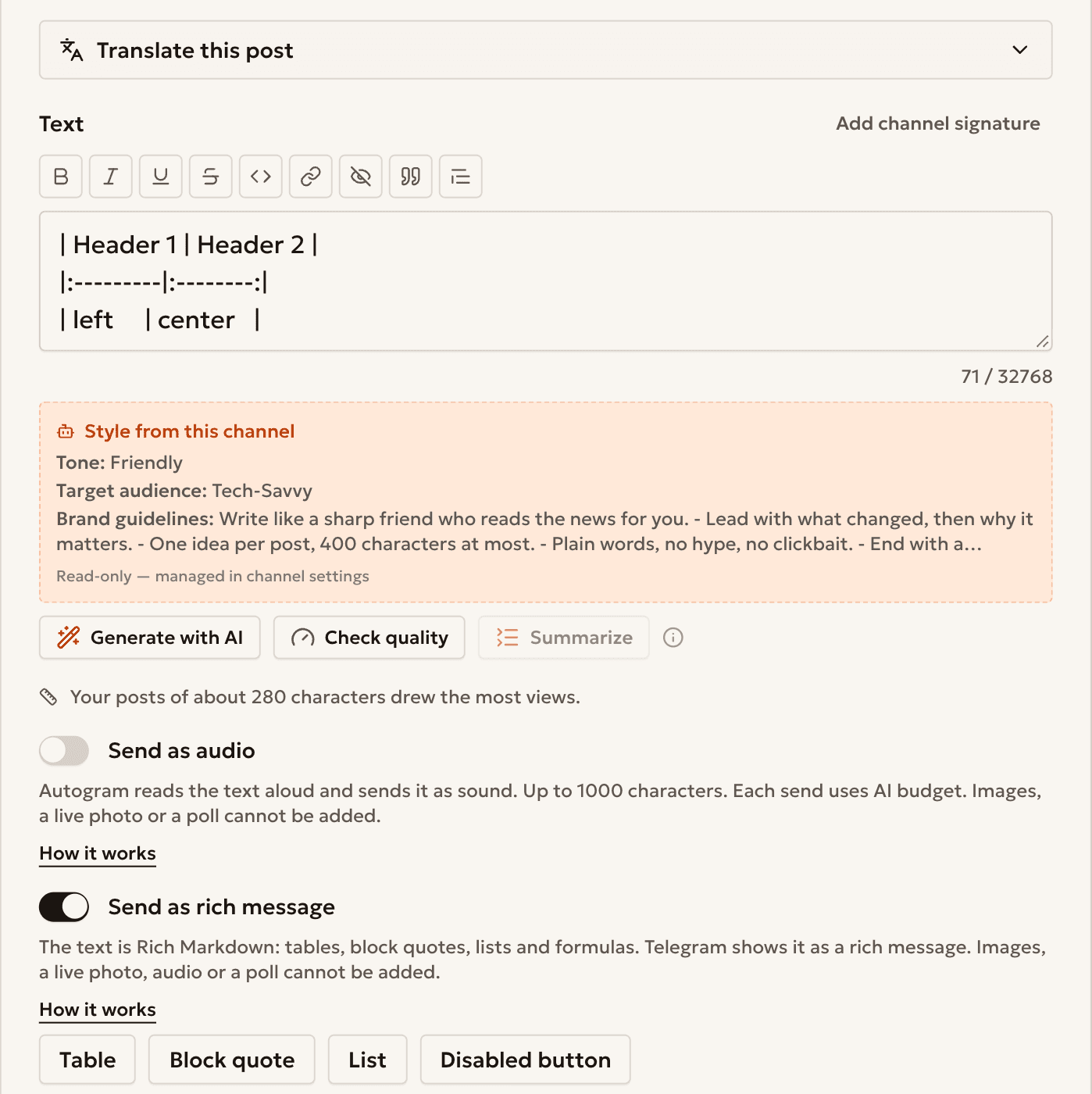
Turn on the switch
Open Posts, press Create and turn on Send as rich message.
Rich messages need the Solo plan or higher.

Step 2
Insert a block
Press Table, Block quote, List or Disabled button to add a block to the text.
The text is Rich Markdown. You can also type it yourself.

Step 3
Fill it in and publish
Replace the sample with your own text, up to 32,768 characters, then schedule or publish the post.
A rich message is text only. It cannot have images, a Live Photo, a poll or audio.
Example
A price table
A shop channel sends its weekly prices as a table.
- Format
- Rich message
- Block
- Table
- Length
- Up to 32,768 characters
Common questions
Which plan do I need?
Solo or higher. On Free the switch is off and a note names the plan.
Can I add inline buttons?
Yes. Inline buttons work as on any post.
Where can I not use it?
An ad, an automation post, a repeating post and a recycle pool entry cannot be a rich message. A post that is already in the channel keeps its format.
Ready to start?
Create an account and connect your channel.